
You are using an out of date browser. It may not display this or other websites correctly.
You should upgrade or use an alternative browser.
You should upgrade or use an alternative browser.
Threadmarks
View all 207 threadmarks
Reader mode
Reader mode
Recent threadmarks
Wagon wheel to run on 0-F, 0-MF and (regauged) S7 GER sand wagon ( Diversion : railbuses at the Middy and elsewhere ) ( Diversion : soldering white metal to brass with the RSU ) New The Heybridge Railway goes DCC . . converting the locos New . . controller usability, and reclaiming old decoders New . . first steps with JMRI New . . Sprog installation New
. . first steps with JMRI
New

RichardG
Western Thunderer
I will write about this here if I end up with something I feel is genuinely useful and worth sharing.
Well, I have installed the current release of JMRI (version 5.14) onto my late-2013 iMac which runs OS 10.15.8 'Catalina', and the software seems to be working. This is just editing the roster, I don't have any DCC hardware connected yet.
I learnt one important thing along the way: the version of Java for this combination must be version 11. The documentation for JMRI points the user to Java version 17, and while this appears to install, it will not run.
I have found my JMRI configuration files too. They are in the user's Library folder, which Apple have set as a hidden folder by default.
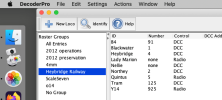
So I feel buoyed with success. The JMRI roster seems like a fair way to manage a collection of models, and I now have a roster holding details of every H0, 4mm and 7mm model I possess

I await a Sprog IIv4 from Coastal DCC, and when this arrives I can hopefully start managing and indeed optimising decoders.
RichardG
Western Thunderer
Two and a half days later I have the SprogIIv4 from Coastal DCC. This is connected up to the iMac and some temporary programming tracks, and all seems to be working.

Setting up the serial port on the iMac is as unintuitive as installing Java! I kept choosing different settings until I reached one that worked.
DecoderPro now knows the salient details of all five DCC locos for the Heybridge Railway, and most of my DCC models in S7, 00 and H0 too. Two early observations:
I need to have a think about how often and where I will set up my decoders. This ought to tell me whether to build a dedicated programming track with the Sprog built into it, or carry on with crocodile clips and loose bits of track. Still, this has been a satisfying few days.
Setting up the serial port on the iMac is as unintuitive as installing Java! I kept choosing different settings until I reached one that worked.
DecoderPro now knows the salient details of all five DCC locos for the Heybridge Railway, and most of my DCC models in S7, 00 and H0 too. Two early observations:
- The task of examining every model has found a few configured for 14 speed steps, and one with an intermittent connection inside it.
- Some of the xml files for better decoders are quite colossal, like half a million bytes for a LokPilot5. Looking at anything beyond the basic CVs, their configuration task looks overwhelming for a pencil and paper and setting one byte at a time.
I need to have a think about how often and where I will set up my decoders. This ought to tell me whether to build a dedicated programming track with the Sprog built into it, or carry on with crocodile clips and loose bits of track. Still, this has been a satisfying few days.
Last edited:
I don't know if it's the same for a Mac but I find that when using my Sprog with Windows I must connect it first and only power up JMRI afterwards. If I don't JMRI can't see the Sprog. I also find you need to use the same usb port otherwise a different connection is offered that JMRI doesn't recognise and you have to dive into preferences to set it up again. I also tend to save a copy of the roster elsewhere in case JMRI goes pear shaped and I have to re-install - I've had to do this a few times over the last 15 years, or I want to use another computer with the Sprog for one reason or another.
Bob
Bob
RichardG
Western Thunderer
This is the first time I have connected some hardware (other than a mouse and keyboard) to my iMac. I connected the Sprog and powered it up (the iMac was already running) and then started JMRI and set things up. It was easier than I feared.I don't know if it's the same for a Mac but I find that when using my Sprog with Windows I must connect it first and only power up JMRI afterwards. If I don't JMRI can't see the Sprog.
With the iMac being a desktop machine with a few spare USB ports, I intend to leave the USB cable plugged in where it is!I also find you need to use the same usb port otherwise a different connection is offered that JMRI doesn't recognise and you have to dive into preferences to set it up again.
I get nervy during this sort of mixed hardware/software configuration because the result is always a go or a no-go. I once had a Windows laptop which seemed to reallocate the numbers to its COM ports at random, but maybe it was according to the phases of the moon or the state of the tide. My iMac is ancient but very stable, so hopefully I have left some of the worst quirks of Windows behind

Yorkshire Dave
Western Thunderer
This ought to tell me whether to build a dedicated programming track with the Sprog built into it, or carry on with crocodile clips and loose bits of track. Still, this has been a satisfying few days.
I would - just stick three pieces of track to a shelf (16.5mm (HO), 32mm (O) and 33mm (S7)) or two if S7 can double up for O and use sticky back velcro to hold the Sprog II on the board. It'll prevent the wires becoming weakened at the plug. It's the reason why I mounted all my programmers onto a single board with a selector box and use 4mm banana plugs to connect the programming tracks.
The only time I think you're likely to resort to crocodile clips is where you need a 2m run for ESU CV54=0 autotune.
RichardG
Western Thunderer
I don't know if it's the same for a Mac but I find that when using my Sprog with Windows I must connect it first and only power up JMRI afterwards. If I don't JMRI can't see the Sprog.
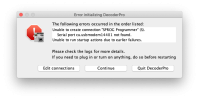
This is the message on my iMac.
I think it is fair for software to fail to run if it cannot see the hardware it needs. JMRI sees the problem and suggests corrective actions, and it doesn't lock you out. I am happy enough with this.
. . Sprog installation
New
RichardG
Western Thunderer
I have thought about a few ways to arrange my Sprog with a programming track. This is never going to be terribly elegant because the Sprog needs three electrical connections going to three different items of hardware; and I'd like to be able to see the LEDs too.
I have settled on the back of my fiddle yard, with a dedicated offline connector for any of my cassettes. I have put a chunky 12 volt power supply under the baseboard, initially to run the Sprog and later to run some lighting above the sorting area.
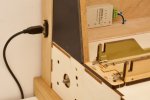
The fiddle yard gets a USB port salvaged from my lockdown layout. This will be at the front (and unused) at a show but it might start a discussion about building a reversible fiddle yard. The iMac is about a foot away to the left.
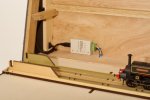
I am left-handed, so the Sprog sits in a corner I find awkward to use.
So, another power supply, another 13 amp plug. My tiny railway now needs four 13 amp sockets, these to supply the Sprog, layout lighting, DCC controller, and router. And a fifth for the iMac. Naturally, these are spread around the room with five separate switches. Such is life.
I have settled on the back of my fiddle yard, with a dedicated offline connector for any of my cassettes. I have put a chunky 12 volt power supply under the baseboard, initially to run the Sprog and later to run some lighting above the sorting area.
The fiddle yard gets a USB port salvaged from my lockdown layout. This will be at the front (and unused) at a show but it might start a discussion about building a reversible fiddle yard. The iMac is about a foot away to the left.
I am left-handed, so the Sprog sits in a corner I find awkward to use.
So, another power supply, another 13 amp plug. My tiny railway now needs four 13 amp sockets, these to supply the Sprog, layout lighting, DCC controller, and router. And a fifth for the iMac. Naturally, these are spread around the room with five separate switches. Such is life.
Last edited:

simond
Western Thunderer
RichardG
Western Thunderer
Very droll. I already have six such extension leads in the hobby room. All but one are fixed onto walls or furniture, so it's not quite as haphazard as it sounds. Four are connected to wall sockets but the other two have to be daisy-chained from these first four.other sources are available!
I truly don't want any more, but the need for them would reduce if I ever get round to getting some new ceiling lighting, properly wired in through the loft.
Yorkshire Dave
Western Thunderer
When I was looking at a shed for a railway room-cum-workshop I worked out I required 15 power sockets - 10 UK 3-pin and 5 German Schuko (for German and Austrian equipment and power tools).
Layout DCC command station PSU
Layout lighting PSU
Analogue controller
Programming track PSU
Mini drill
Pillar drill
Soldering iron
Workbench lamp
Laptop PSU
Monitor
Fridge
Kettle
Air compresser
2 spare
Given the amount of electronic and electrical appliances we have today the number of power sockets we require for any given room is huge. For houses there is no legal minimum of the number of power sockets per room, however the NHBC do provide guidelines for the minimums. Obviously, the number of power sockets we see in a house depends upon when it was built. It's only over the last 40 years or so we've witnessed a massive increase in the number of domestic electronic appliances. I recall when we moved into an inter-war suburban mock-tudor semi in the 1970s the living room had enough sockets for a radio, TV, record player and a couple of table lamps - no computers, monitors, printers, routers, phone chargers, battery chargers, etc, etc.
Layout DCC command station PSU
Layout lighting PSU
Analogue controller
Programming track PSU
Mini drill
Pillar drill
Soldering iron
Workbench lamp
Laptop PSU
Monitor
Fridge
Kettle
Air compresser
2 spare
Given the amount of electronic and electrical appliances we have today the number of power sockets we require for any given room is huge. For houses there is no legal minimum of the number of power sockets per room, however the NHBC do provide guidelines for the minimums. Obviously, the number of power sockets we see in a house depends upon when it was built. It's only over the last 40 years or so we've witnessed a massive increase in the number of domestic electronic appliances. I recall when we moved into an inter-war suburban mock-tudor semi in the 1970s the living room had enough sockets for a radio, TV, record player and a couple of table lamps - no computers, monitors, printers, routers, phone chargers, battery chargers, etc, etc.

Osgood
Western Thunderer
You can only use so many appliances that do not need to be permanently connected at any given time - hence the benefit of plugs and flexi cable.
But if you wish to hard-wire a lot of these in, it only needs them to be wired into a rotary switching device to ensure you can only use one at a time and thus never overload the socket circuit.
But if you wish to hard-wire a lot of these in, it only needs them to be wired into a rotary switching device to ensure you can only use one at a time and thus never overload the socket circuit.
simond
Western Thunderer
When I was looking at a shed for a railway room-cum-workshop I worked out I required 15 power sockets - 10 UK 3-pin and 5 German Schuko (for German and Austrian equipment and power tools).
Layout DCC command station PSU
Layout lighting PSU
Analogue controller
Programming track PSU
Mini drill
Pillar drill
Soldering iron
Workbench lamp
Laptop PSU
Monitor
Fridge
Kettle
Air compresser
2 spare
Given the amount of electronic and electrical appliances we have today the number of power sockets we require for any given room is huge. For houses there is no legal minimum of the number of power sockets per room, however the NHBC do provide guidelines for the minimums. Obviously, the number of power sockets we see in a house depends upon when it was built. It's only over the last 40 years or so we've witnessed a massive increase in the number of domestic electronic appliances. I recall when we moved into an inter-war suburban mock-tudor semi in the 1970s the living room had enough sockets for a radio, TV, record player and a couple of table lamps - no computers, monitors, printers, routers, phone chargers, battery chargers, etc, etc.
I have not yet decided what to provide in the new shed, but when I rebuilt our kitchen in 2006, I put in four pairs of double sockets on the worktop, determined that we would have “enough”. Twenty years on, it looks like I didn't get it too wrong, though it was probably marginal before the kids flew the nest. In hindsight it would have been smarter to add another four under the worktop for things like the robot vacuum cleaner and the Bluetooth sound system. There was a desktop computer under there at one point, but that’s long gone.
I do have to plan power for the shed. I’m still trying to work out track plans and thus baseboards. Once that’s settled, I can work out what extra
One thing I will have is an “emergency stop” button next to the door, which will turn off the layout, and anything hot like soldering irons, and some of the other sockets. Not for emergencies per se, but so when I lock up the shed at the end of a session, I can be confident that everything that needs to be off, is off. Obviously that doesn’t want to include laptop charger, 3D printers, etc.
RichardG
Western Thunderer
Well, in my two-bedroom house the upstairs ring circuit supplies just four twin socket outlets, and with gas central heating I never get anywhere near the rated 32 amps.
Regarding appliances, only the compressor presents a noticeably unpleasant (highly inductive) load. It came with a one-metre mains cable and strict instructions to never use an extension lead, which seems to be a near-impossible combination to satisfy; but at least it shares its extension lead with only one other device.
For the rest of the gadgets, I doubt if they can draw 13 amps in total; and diversity is so high (only me in the room) the usual electrical load is tiny. My struggle is always in keeping things neat and tidy. I have just removed one of the socket strips from back of my workbench. So now the bench has six sockets instead of nine, and the room count of extension leads drops to five with only one daisy-chained off another.
When I rewired my kitchen, I too put four twin sockets above the worktops. This doubled up on what I had before. I could have got away with three, but then again most of my toys are in the hobby room.
For the garden room, I specified five double outlets. One each side of the entrance door, and the rest spread out between them. I thought I could run all of the office equipment from the eight sockets on the front of the UPS, but I still ended up with an extension lead for the radio and desk lamp.
The model engineers put emergency stop buttons at the entrance doors. I think this is a good idea. In my hobby room, two of the three twin sockets are hidden behind furniture. The living room is just as bad. The only "all off" switches I have are the MCBs.
Regarding appliances, only the compressor presents a noticeably unpleasant (highly inductive) load. It came with a one-metre mains cable and strict instructions to never use an extension lead, which seems to be a near-impossible combination to satisfy; but at least it shares its extension lead with only one other device.
For the rest of the gadgets, I doubt if they can draw 13 amps in total; and diversity is so high (only me in the room) the usual electrical load is tiny. My struggle is always in keeping things neat and tidy. I have just removed one of the socket strips from back of my workbench. So now the bench has six sockets instead of nine, and the room count of extension leads drops to five with only one daisy-chained off another.
When I rewired my kitchen, I too put four twin sockets above the worktops. This doubled up on what I had before. I could have got away with three, but then again most of my toys are in the hobby room.
For the garden room, I specified five double outlets. One each side of the entrance door, and the rest spread out between them. I thought I could run all of the office equipment from the eight sockets on the front of the UPS, but I still ended up with an extension lead for the radio and desk lamp.
The model engineers put emergency stop buttons at the entrance doors. I think this is a good idea. In my hobby room, two of the three twin sockets are hidden behind furniture. The living room is just as bad. The only "all off" switches I have are the MCBs.
RichardG
Western Thunderer
My tiny railway now needs four 13 amp sockets, these to supply the Sprog, layout lighting, DCC controller, and router. And a fifth for the iMac.
German Schuko
I don't particularly want to adopt Schuko for the layout, but I do think of IEC 60320 C13/14 from time to time. A four- or six-way distribution box is compact enough to put under one of the baseboards.
RichardG
Western Thunderer
I want to wrap up my posts on JMRI because detailed discussions probably belong on their own user forum.
But I will record here, I have set up the motor control in the decoders of 22 models in just a few sessions with DecoderPro. The software found two locos configured for 14 speed steps and a tram with a dodgy connection to its decoder. I have configured a complex speed curve for the shunters I think will benefit from one. And I have learnt a quick and dirty way to copy a speed profile to multiple locomotives, details here.
So while the application of JMRI and a Sprog to such a simple layout as Heybridge Basin is always going to be limited, its application to decoders has already been extremely useful.
But I will record here, I have set up the motor control in the decoders of 22 models in just a few sessions with DecoderPro. The software found two locos configured for 14 speed steps and a tram with a dodgy connection to its decoder. I have configured a complex speed curve for the shunters I think will benefit from one. And I have learnt a quick and dirty way to copy a speed profile to multiple locomotives, details here.
So while the application of JMRI and a Sprog to such a simple layout as Heybridge Basin is always going to be limited, its application to decoders has already been extremely useful.

Chris Veitch
Western Thunderer
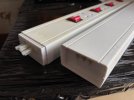
While tearing down my work room for a house move recently I’ve had to dismantle the power supply strip that I’ve used for about 20 years (see photo). It’s a system which was sold by Wickes in the early 2000s and consists of interconnecting trunking which all ran off a common 13A plug using sections with 4 x 13A sockets each plus various length connectors. It all clipped into a moulded wall trough making a very neat design for a workbench where there were a lot of devices with a small load, with usually only one being used at any one time. Sadly they withdrew it from sale shortly after I bought mine and I’ve never seen anything else like it for the home consumer (I’m aware there are desk-mounted systems for IT equipment but they are very expensive, probably over-engineered for what we need and don’t have the wall mount).When I was looking at a shed for a railway room-cum-workshop I worked out I required 15 power sockets - 10 UK 3-pin and 5 German Schuko (for German and Austrian equipment and power tools).
Layout DCC command station PSU
Layout lighting PSU
Analogue controller
Programming track PSU
Mini drill
Pillar drill
Soldering iron
Workbench lamp
Laptop PSU
Monitor
Fridge
Kettle
Air compresser
2 spare
Given the amount of electronic and electrical appliances we have today the number of power sockets we require for any given room is huge. For houses there is no legal minimum of the number of power sockets per room, however the NHBC do provide guidelines for the minimums. Obviously, the number of power sockets we see in a house depends upon when it was built. It's only over the last 40 years or so we've witnessed a massive increase in the number of domestic electronic appliances. I recall when we moved into an inter-war suburban mock-tudor semi in the 1970s the living room had enough sockets for a radio, TV, record player and a couple of table lamps - no computers, monitors, printers, routers, phone chargers, battery chargers, etc, etc.
I'm sure someone will tell me why it's a really bad idea, but it's served me well for many years.

76043
Western Thunderer
I for one have grappled with DCC motor tuning, seems to be the devil's own business, so if you have any tips please do enlighten us.I want to wrap up my posts on JMRI because detailed discussions probably belong on their own user forum.
But I will record here, I have set up the motor control in the decoders of 22 models in just a few sessions with DecoderPro. The software found two locos configured for 14 speed steps and a tram with a dodgy connection to its decoder. I have configured a complex speed curve for the shunters I think will benefit from one. And I have learnt a quick and dirty way to copy a speed profile to multiple locomotives, details here.
So while the application of JMRI and a Sprog to such a simple layout as Heybridge Basin is always going to be limited, its application to decoders has already been extremely useful.
Thanks
Tony
Threadmarks
View all 207 threadmarks
Reader mode
Reader mode