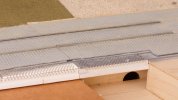
7mm Heybridge Basin

( Diversion : shipping of timber to Chelmsford )
  • RichardG

    Western Thunderer
    Marriage page 26.jpg

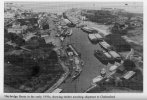
    This might be the most useful photograph of Heybridge Basin I ever see. The scene in the 1890s would be similar, minus the private cars. The lighters were 60 x 16 feet, and their design didn't change much during the shift from horse to diesel power.

    My imaginary railway station is on the land where the cars are parked, with the line to Heybridge following the towing path to the lower left. The bulk timber is dealt with on the opposite side of the basin (behind the viewer of the layout), which conveniently leaves the railway installation to deal with other commodities and occasional small loads of timber. So everything I have made so far still fits in with the location.

    I chanced upon this photo in a book "Barging into Chelmsford" written by John Marriage, the second edition published in 1997 by Ian Henry Publications of Romford. I have been looking for this book for ages, and then last Friday I bought one of four brand-new copies sitting in the charity bookshop at Hylands Park. Such is life. The book fills in a lot of unknowns about the operation of the navigation during the late 19th and early 20th centuries.
     
    Backscene . . experiments and discussion
  • RichardG

    Western Thunderer
    But really, I have got to have an idea of the backscene before I decide on fences. A more open post and rail type might help to connect the scene onto the model.

    P1050642.jpeg
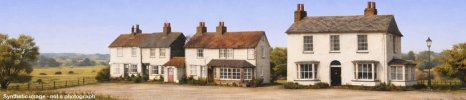
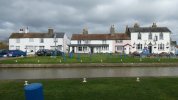
    These buildings dominate the scene beside the navigation at Heybridge Basin. They were all there in the period of my layout. The railway is sitting along the area in front of the buildings with the cars and blue posts.

    Heybridge_Backscene_2000x430mm_300dpi_Composed - WT.jpeg
    A mate has made this for me using ChatGPT. He has split the buildings apart and set them on a receding building line for artistic reasons. Various output filters are possible but this image is rendered in the style of John Constable. I rather like this! Hopefully, this scene can locate the layout at Heybridge Basin, and with a more open and less closed-in appearance.

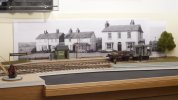
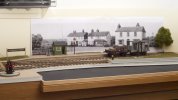
    Here are two mock-ups using sheets of A4 paper taped together:

    DSC_1799.jpeg
    Option 1 (larger)

    DSC_1800.jpeg
    Option 2 (smaller)

    I think Option 1 looks better in these photos and Option 2 looks better in my hobby room, which doesn't help much. The camera viewpoint is 150 mm below mine, and this doesn't help either but I am constrained by my tripod.

    So if anyone can advise on how to choose the scaling factor for backscene buildings this would be a great help.

    Edited 3 Feb 2026 to add watermark to AI-generated image
     
    Last edited:
    Backscene . . completed
  • RichardG

    Western Thunderer
    WhatsApp Image 2026-02-08 at 11.02.38.jpeg
    The backscene is now “made”. This is a collage of printed backscenes, AI-rendered buildings, very low relief modelling and a little paint to pull things together.

    I am so pleased with this . . . here are some photos from different viewpoints . . .

    DSC_1845.jpeg
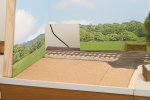
    Module B remains an almost empty canvas. Some hardwood trim over the end cheek would be good.

    DSC_1847.jpeg
    Maybe put some cows here, or even bison :)

    DSC_1853.jpeg
    DSC_1852.jpeg
    The perspective works from a few angles.

    DSC_1855.jpeg
    The wall should be garden wall bond not English bond but I wanted something quick and easy. When I make the sea lock (out of the frame to the right), I can go for local yellow brick and re-do the wall to match. There is space for a low-relief building here. This would remove the problem of distant woodland apparently extending into the sea.

    I have tried very hard with the colouring on the layout and I could not wish for a better match with the backscene. My gut feeling is, the backscene is a fairly dramatic alteration to the layout yet I will get used to it quite easily. Maybe I don't need to tone down the backscene very much at all:drool:
     
    Low level photos . . using DSLR on a monopod
  • RichardG

    Western Thunderer
    I have dug out my monopod. I haven't used this for years, quite possibly not since 2006 when I let finally go of slide film. Not quite the top deck of the bus but I have set it up as if the photographer is standing on top of a load of timber in a barge.

    DSC_1874.jpeg
    Back to the 85 mm lens. This is always my favourite, it makes models a nice shape, it gets me far enough back to fit in a reflector (this lifts the shadows in the underframe) and I can control the background too.

    Fundamentally, I think I have done the right thing by having the roadway on the backdrop - being a vertical surface, the lens doesn't foreshorten it at all and I can knock it out of focus in a consistent way to match the buildings :)
     
    . . using a phone camera
  • RichardG

    Western Thunderer
    Rather than a camera use a smart mobile phone. I took this on my Samsung smart phone which has Pro camera settings with the lens at HO scale eye level. Smart phones, being thin, have the advantage they can be set almost anywhere on the layout.

    View attachment 257399

    My own smart phone is a Google Pixel 6a. The phone camera doesn't have pro settings, but it can save its images as RAW files. These are .dng files and amazingly they are compatible with my ancient iMac.

    2026-02-11 02.16.10.jpeg
    The viewpoint here is a little low, as if the camera is at waist or chest level. Perhaps a reflex camera with a focussing screen on the top. All of the lighting and shadows here are from the lighting rig, I am sure I have got this in just the right place. The trees are out of focus on the backscene, and rendered further out of focus here.

    2026-02-11 02.22.53.jpeg
    Another slightly low viewpoint, the photographer would be standing on a barge in the basin.

    2026-02-11 09.16.49.jpeg
    A higher viewpoint, closer to that of a person. The buildings are about 80 mm behind the wagon but look so much further away. The shadows on the chimney stacks align pretty well with those on the wagon.

    These three photos are RAW files from the Pixel 6a, with the jpg files for WT created in the iMac. I rather like these photos, I think the colours have a slightly soft appearance.
     
    . . using a pinhole 'lens'
  • RichardG

    Western Thunderer
    2026-02-14 20.23.53.jpeg
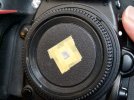
    I have had a go with a pinhole lens on the DSLR. This is a spare body cap, drilled through 4mm diameter and with a piece of kitchen foil providing the pinhole. The foil is darkened on the inside using a black Sharpie.

    DSC_1913.jpeg
    I had three goes at making pinholes. This is the best result using the best pinhole so I will call it a day here with pinhole lenses for model photography.

    I do like the results achieved by @Yorkshire Dave and hopefully one or two of his images can make it onto a display board in front of the fiddle yard. Thanks Dave :thumbs:
     
    . . removing shadows from display case
  • RichardG

    Western Thunderer
    Now, does anyone have anything to say about model railways? :)

    I'm not ready yet!

    2026-02-15 12.27.51.jpeg
    The lighting rig casts multiple shadows from this display case onto the backscene. Up until now I have been removing these shadows by dismantling the bottom shelf of the display case. Which is a bit laborious.

    An easier method is to throw more light onto the model, in this case from a fluorescent studio lamp. I found this and its reflector in a charity shop. The lamp specification is 135W, triphosphor, 5,500K and Ra>92. Looking at similar ones on Amazon it probably produces the equivalent of around a 650W light bulb. Which is quite a lot of light on a model barely half a metre away.

    2026-02-15 12.19.07.jpeg
    The result is, the phone camera lowers its simulated ISO rating to obtain a correct exposure.

    I am particularly happy with the rendering of the wheels, the sharpness from end to end, and the join in the backscene. The rails in the foreground are softer than I would really like but hey, if the phone camera can do this I should be satisfied. Any shadow on the backscene from the studio lamp has been washed away by the lighting rig.

    I have enjoyed all of the contributions here from everyone since I started to post photos with the new backscene.
     
    . . softer lighting
  • RichardG

    Western Thunderer
    2026-02-15 18.25.18.jpeg
    Finally, the fluorescent studio lamp with a translucent brolly. I have never used this brolly before, it seems quite huge indoors.

    2026-02-15 18.27.29.jpeg
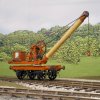
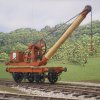
    Nicely soft, so much so the join in the backscene has all but disappeared. I do like this look for the crane, though whether lighting for a fashion model will be quite right for every model train I'm not sure.

    I removed the telegraph office for my last two layout photos. The scene is so anonymous I am sure it can double as a photo plank, so that's one less thing to build and find somewhere to store.
     
    Top